
Skip to content
  • Home
  • YouTube
  • About
  • Contact
Learn to Code and Code to Learn

Learn to Code and Code to Learn

Your Journey to Code Mastery

  • Interview Prep Sheet
    • TCP DSA 75
    • TCP DSA 150
    • TCP DSA 351
    • TCP HLD 50
    • TCP HLD 101
  • General
    • Setup
    • Mastering in C programming (Crash Course)
  • DSA Patterns
    • Fast and Slow Pointer
    • sliding window
      • fixed size sliding window
      • Variable size sliding window
  • Coding Prep
    • Leetcode Problems
      • Leetcode Practice
      • Leetcode PTOD
      • TCP DSA 150
    • GFG
      • GFG Practice
      • GFG PTOD
    • Company wise Interview Questions
      • Google
      • Microsoft
  • Programming
    • C Programming
    • C++
      • C++-11
      • c++-14
      • STL
    • Python
  • HLD
    • TCP HLD 50
    • TCP HLD 101
  • LLD
    • SOLID Principle
    • Design Pattern
      • Creational Design Patterns
        • Singleton
  • Toggle search form

VSCode step-by-step setup for C++ in Windows

Posted on September 30, 2023September 30, 2023 By thecodepathshala 4 Comments on VSCode step-by-step setup for C++ in Windows

To set up Visual Studio Code (VSCode) for C++ development on Windows, follow these step-by-step instructions:

Install Visual Studio Code:

  1. Download the Visual Studio Code installer for Windows from the official website: Download Visual Studio Code.
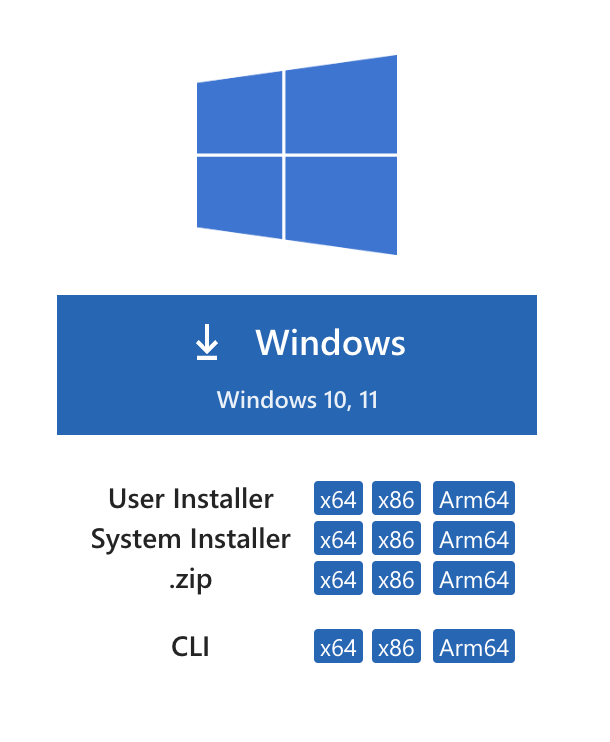
  2. Run the downloaded installer (typically named VSCodeSetup-x64.exe) and follow the installation instructions. You can choose the default settings during installation.

Install a C++ Compiler:

You’ll need a C++ compiler to compile and run your C++ programs. One of the most commonly used C++ compilers on Windows is MinGW (Minimalist GNU for Windows). Here’s how to install MinGW:

  1. Download the MinGW installer from the official website: MinGW Installation Manager.
  2. Run the MinGW installer (mingw-get-setup.exe) and follow these steps:
    • Select “Basic Setup” from the left-hand menu.
    • In the “All Packages” section, select “mingw32-base” and “mingw32-gcc-g++” for installation or you can select all.
    • Go to the “Installation” menu and click on “Apply Changes.”
    • Confirm the installation of selected packages.
    • Wait for the installation to complete.

Add MinGW to System Path:

To use MinGW from the command line, you need to add its bin directory to your system’s PATH environment variable:

  • Open the Windows “Start” menu, search for “Environment Variables,” and select “Edit the system environment variables.”
  • In the “System Properties” window, click the “Environment Variables” button.
  • In the “Environment Variables” window, under the “System variables” section, scroll down to find the “Path” variable and select it.
  • Click the “Edit” button.
  • In the “Edit Environment Variable” window, click “New” and add the path to the MinGW bin directory. The path is usually something like C:\MinGW\bin. Ensure each path entry is separated by a semicolon (;).
  • Click “OK” to save the changes and close all the windows.

Install Visual Studio Code Extensions:

  1. Open Visual Studio Code.
  2. Go to the Extensions view by clicking the Extensions icon in the sidebar or pressing Ctrl+Shift+X.
  3. Search for and install the following extensions:
    • C/C++ by Microsoft: Provides C/C++ language support and debugging capabilities.

Create a C++ Project:

  • Create a new folder on your computer where you want to store your C++ projects.
  • Open VSCode and click on “File” in the top-left corner, then select “Open Folder” and choose the folder you just created.
  • Inside the folder, create a new C++ source file with a .cpp extension. You can do this by right-clicking on the folder in the VSCode sidebar, selecting “New File,” and giving it a name like main.cpp.
  • Write your C++ code in the main.cpp file.

Compile and Run the C++ Program:

  • Open the main.cpp file in VSCode.
  • To compile and run your C++ program, you can use the VSCode terminal or an integrated terminal:
    • Open the integrated terminal by clicking “Terminal” in the VSCode menu and selecting “New Terminal.”
  • In the terminal, navigate to the directory where your C++ file is located.
  • Compile the C++ program using the g++ compiler. For example:
g++ -o myprogram main.cpp

This command compiles main.cpp and creates an executable file named myprogram in the same directory.

  • Run the executable by entering its name in the terminal:
./myprogram
  • You should see the output of your C++ program displayed in the terminal.

That’s it! You’ve successfully set up Visual Studio Code for C++ development on Windows. You can continue to write, compile, and run C++ programs within the VSCode environment.

C++, Programming, Setup

Post navigation

Previous Post: ROADMAP : Mastering C Programming in 15 Days – From Basics to Advanced (Crash course)
Next Post: Mastering C Programming in 15 Days | Day 1: “C” Programming Introduction, Basics and Datatypes

More Related Articles

C program to find sum of odd numbers from 1 to n C Programming
Class Templates C++
C program to create calculator using switch case and functions C Programming
C program to find power of a number using for loop C Programming
C program to print day of week name using switch case C Programming
C program to convert Hexadecimal to Decimal number system C Programming

Comments (4) on “VSCode step-by-step setup for C++ in Windows”

  1. https://www.waste-ndc.pro/community/profile/tressa79906983/ says:
    May 20, 2024 at 9:07 pm

    Righgt now iit looks like Drupal is the top blogginbg platform out there right now.
    (from what I’ve read) Is that what you’re using on your blog? https://www.waste-ndc.pro/community/profile/tressa79906983/

    Reply
  2. https://www.waste-ndc.pro/community/profile/tressa79906983/ says:
    May 20, 2024 at 9:08 pm

    Rigyht now it looks like Drupal is the top blpogging platform out there right now.
    (fromwhat I’ve read) Is that what you’re using on your blog? https://www.waste-ndc.pro/community/profile/tressa79906983/

    Reply
  3. http://boyarka-Inform.com/ says:
    January 13, 2025 at 3:59 pm

    I’mextremely impressed along with yiur writing talents as neatly as
    with the structure to your blog. Is this a paid topic or did you modify it yourself?

    Either way stay up the nice quaity writing, it’s uncommon to look a nice weblog
    like this one these days.. http://boyarka-Inform.com/

    Reply
  4. http://boyarka-Inform.com/ says:
    January 13, 2025 at 3:59 pm

    I’m extremely impressed along with your writing alents as neatly as with the structure to youur blog.
    Is this a paid topic or did you modify it yourself? Either wway stay
    uup the nice quality writing, it’s uncommon to look a nice weblog like this one these days.. http://boyarka-Inform.com/

    Reply

Leave a Reply Cancel reply

Your email address will not be published. Required fields are marked *

Archives

  • May 2026
  • August 2025
  • March 2025
  • February 2025
  • January 2025
  • December 2024
  • August 2024
  • April 2024
  • March 2024
  • February 2024
  • January 2024
  • December 2023
  • November 2023
  • September 2023
  • February 2023
  • February 2022
  • January 2022
  • December 2021
  • November 2021
  • October 2021

Categories

  • Algo
  • Array in C
  • C Programming
  • C++
  • C++
  • Company Wise
  • Competitive Programming
  • Design Pattern
  • DS
  • DS & Algo
  • Fast and Slow Pointer
  • fixed size sliding window
  • General
  • GFG
  • GFG PTOD
  • HLD
  • hld101
  • Interview Prep Sheet
  • Interview Questions
  • Leetcode Problems
  • Leetcode PTOD
  • LLD
  • Low-level design
  • Mastering in C programming (Crash Course)
  • Neetcode 150
  • Programming
  • Roadmap
  • Setup
  • Setup
  • sliding window
  • SOLID Principle
  • STL
  • string in c
  • System Design
  • TCP DSA 150
  • TCP DSA 351
  • TCP DSA 75
  • TCP HLD50
  • Top X
  • Variable size sliding window

Tags

algorithm array basic c++ coding interview C Programming Crash Course data structure and algorithm design pattern dsa easy Fixed size sliding window fubctions GFD gfg GFG PTOD hard HLD jump game LC PTOD leetcode Leetcode PTOD Leetcode Top Interview 150 LLD loop loops Low-level design Mastering C Programming in 15 Days matrix medium rotate array searching&sorting sliding window solid STL string string in c sunction in c system design TCP HLD50 TCP HLD101 Template in C++ Top Top 20 coding patterns to master MAANG Interview Top interview 150

C++ Vector in 20 Minutes! 🔥

In this practical C++ Vector tutorial, we will learn C++ STL Vector from basics to interview-level concepts with complete code examples.

Instead of only learning theory, we will actually write and run code to understand how Vector works, how to use its important functions, and how Vector is used in DSA and coding interviews.

If you're preparing for DSA, LeetCode, coding interviews, placements, or learning C++ STL, this video is for you. 🚀

🔥 WHAT YOU WILL LEARN

00:00 – C++ Vector Introduction
00:50 – What is Vector?
02:00 – Array vs Vector
03:30 – Vector Declaration & Initialization
05:00 – Adding Elements with push_back()
06:30 – Removing Elements with pop_back()
07:30 – Accessing Vector Elements
08:30 – size() vs capacity()
10:00 – How push_back() Works Internally
12:00 – reserve() vs resize()
14:00 – Traversing a Vector
15:30 – Important Vector Functions
17:00 – Sorting & Searching a Vector
18:30 – Vector Time Complexity
19:30 – DSA & Coding Interview Tips

💻 PRACTICAL CODE COVERED

✅ vector(int) declaration
✅ Vector initialization
✅ push_back()
✅ pop_back()
✅ size()
✅ capacity()
✅ front()
✅ back()
✅ empty()
✅ clear()
✅ reserve()
✅ resize()
✅ Indexing
✅ Traversal using loops
✅ Range-based for loop
✅ Iterators
✅ Sorting
✅ Searching
✅ Practical DSA usage

🧠 IMPORTANT VECTOR CONCEPTS

• What exactly is a Vector?
• Array vs Vector
• Dynamic Array
• size() vs capacity()
• What happens inside push_back()?
• Vector memory allocation
• Vector reallocation
• reserve() vs resize()
• Why Vector indexing is O(1)
• Vector time complexity
• Amortized O(1) push_back()

🎯 WHY SHOULD YOU LEARN VECTOR?

Vector is one of the most frequently used containers in C++ DSA.

You will see Vector regularly in:

🔥 LeetCode Problems
🔥 Coding Interviews
🔥 Competitive Programming
🔥 DSA Problems
🔥 Product-Based Company Interviews
🔥 Placement Coding Rounds

After this video, you should be able to confidently create, modify, traverse and use a Vector in your DSA problems.

💡 INTERVIEW QUESTIONS YOU SHOULD BE ABLE TO ANSWER

👉 What is a Vector in C++?
👉 How is Vector different from an Array?
👉 What is the difference between size() and capacity()?
👉 What happens when push_back() exceeds capacity?
👉 Why is Vector indexing O(1)?
👉 What is the difference between reserve() and resize()?
👉 What is the time complexity of push_back()?
👉 When should you use Vector instead of an Array?

🚀 LEARN C++ STL → MASTER DSA → CRACK CODING INTERVIEWS

This video is part of the C++ STL learning series on TheCodePathshala.

Subscribe to TheCodePathshala for:
✅ C++
✅ DSA
✅ C++ STL
✅ LeetCode
✅ Coding Interview Preparation
✅ System Design
✅ Software Engineering Concepts

If this video helped you understand C++ Vector, LIKE 👍 the video and SUBSCRIBE 🔔 to TheCodePathshala.

Comment below:
What should we cover next in the C++ STL series?

#CPP #CPlusPlus #STL #Vector #DSA #CodingInterview #CPPSTL #LeetCode #Programming #DataStructures 

🔎 YouTube Tags
c++ vector
c++ vector tutorial
c++ vector practical
c++ vector practical tutorial
c++ vector with code
c++ vector complete code
c++ vector explained
vector in c++
vector in c++ stl
c++ stl vector
c++ stl
vector stl
c++ vector in 20 minutes
c++ vector 20 minutes
learn c++ vector
c++ vector for dsa
vector for dsa
c++ dsa
c++ data structures
c++ coding interview
c++ interview preparation
vector interview questions
c++ stl interview questions
vector vs array
array vs vector c++
size vs capacity c++
vector size capacity
push_back c++
push_back vector
reserve vs resize c++
vector reserve
vector resize
vector functions
vector time complexity
vector indexing
c++ programming
learn c++
c++ tutorial
c++ beginners
dsa interview preparation
leetcode c++
coding interview preparation
placement preparation
stl tutorial
stl for dsa

#️⃣ Hashtags
#CPP #CPlusPlus #STL #Vector #DSA #CodingInterview #CPPSTL #LeetCode #Programming #DataStructures
C++ Vector in 20 Minutes 🔥 | Practical Tutorial with Complete Code | DSA & Interviews
C++ Vector + 20 Minutes + Complete Tutorial + DSA + Coding Interviews

Agar aap C++ mein DSA ya Coding Interview ki preparation kar rahe hain, toh ek STL container aapko sabse zyada use karna padega — Vector! 🔥

Lekin kya aapko actually pata hai ki Vector internally kaise kaam karta hai?

Normal array aur vector mein actual difference kya hai?

size() aur capacity() alag kyun hote hain?

push_back() ke peeche kya hota hai?

Aur sabse important — reserve() aur resize() mein kya difference hai?

Is video mein hum C++ STL Vector ko zero se interview level tak samjhenge — sirf functions nahi, balki vector ke internal working, memory allocation aur time complexity ko bhi understand karenge.

🚀 C++ VECTOR IN 20 MINUTES — COMPLETE GUIDE

🔥 IMPORTANT CONCEPTS

In this video, we'll understand:

✅ vector [int] v
✅ Vector vs Array
✅ Dynamic Array
✅ Contiguous Memory
✅ size()
✅ capacity()
✅ push_back()
✅ pop_back()
✅ reserve()
✅ resize()
✅ clear()
✅ empty()
✅ front() / back()
✅ operator[]
✅ Iteration
✅ Reallocation
✅ Amortized O(1) push_back()
✅ O(1) Random Access
✅ Vector Time & Space Complexity
✅ Interview-oriented Vector usage

🧠 SIZE vs CAPACITY

size() → Vector mein currently kitne elements hain.

capacity() → Current allocated storage mein maximum kitne elements fit ho sakte hain without another allocation.

Example:

vector[int] v;

v.push_back(10);
v.push_back(20);
v.push_back(30);

cout - v.size();
cout - v.capacity();

Size aur capacity ka difference samajhna vector ke internal working ko samajhne ke liye extremely important hai.

⚡ push_back() INTERNALLY KYA KARTA HAI?

Jab vector ke paas extra capacity hoti hai, push_back() new element ko available storage mein add kar deta hai.

Lekin jab:

size == capacity

toh vector ko larger memory block allocate karke existing elements ko move/copy karna pad sakta hai. Isi wajah se individual reallocation expensive ho sakti hai, although push_back() ka amortized complexity O(1) hota hai.

🚀 reserve() vs resize()

reserve(n)
→ Future growth ke liye capacity reserve karta hai.
→ Existing size ko change nahi karta.

resize(n)
→ Vector ke actual number of elements ko change karta hai.
→ Elements add ya remove ho sakte hain.

Ye dono functions coding interviews mein frequently confuse kiye jaate hain.

🎯 VECTOR INDEXING O(1) KYUN HAI?

Vector elements contiguous memory mein store hote hain.

Isliye:

v[i]

ko direct address calculation ke through access kiya ja sakta hai.

Conceptually:

address = base_address + i × sizeof(element)

Isi wajah se vector random access O(1) provide karta hai.

💼 CODING INTERVIEWS MEIN VECTOR

Vector DSA problems mein bahut commonly use hota hai:

🔥 Two Sum
🔥 Sliding Window
🔥 Prefix Sum
🔥 Sorting Problems
🔥 Binary Search
🔥 Two Pointers
🔥 Matrix / 2D Vector
🔥 Dynamic Programming
🔥 Graph Representation
🔥 Frequency Arrays
🔥 LeetCode Problems

Agar aap C++ mein DSA kar rahe hain, toh Vector ko sirf ek STL function nahi, balki dynamic array ke concept ke roop mein samajhna bahut important hai.

🔔 WHO IS THIS VIDEO FOR?

This video is perfect for:

✔️ C++ Beginners
✔️ DSA Beginners
✔️ Coding Interview Preparation
✔️ Placement Preparation
✔️ LeetCode Beginners
✔️ Competitive Programming
✔️ Software Engineer Interviews

Agar aapko C++ STL ko practical DSA + interview perspective se seekhna hai, toh TheCodePathshala ko subscribe karein. 🚀

👍 Video helpful lage toh Like karein
💬 Comment karein: size() aur capacity() mein difference pehle pata tha?

🔔 Subscribe for C++, DSA, LeetCode & System Design

#Cpp #CPlusPlus #Vector #CPPSTL #STL #DSA #CodingInterview #LeetCode #CompetitiveProgramming #DSAInCPlusPlus #CPlusPlusProgramming #TheCodePathshala  #LeetCode

🔎 Tags:
c++ vector,
c++ vector tutorial,
c++ vector in 20 minutes,
c++ vector explained,
vector in c++,
vector c++ tutorial,
c++ stl vector,
c++ stl vector tutorial,
c++ vector for dsa,
c++ vector for coding interview,
vector in c++ for beginners,
c++ vector size capacity,
size vs capacity c++,
c++ vector push_back,
push_back internally c++,
c++ vector reserve resize,
reserve vs resize c++,
c++ vector internals,
how vector works in c++,
vector vs array c++,
c++ dynamic array,
c++ vector time complexity,
vector indexing o(1),
c++ vector interview questions,
vector interview questions,
c++ dsa,
dsa in c++,
c++ coding interview,
c++ placement preparation,
leetcode c++,
c++ stl tutorial hindi,
c++ vector hindi,
vector kya hai c++,
c++ vector explained hindi,
c++ vector
c++ vector explained
vector in c++
vector in c++ stl
c++ stl vector
c++ vector tutorial
c++ vector complete tutorial
c++ vector complete introduction
vector c++
vector stl
stl vector
c++ stl
c++ dsa
c++ data structures
vector data structure
dynamic array c++
array vs vector c++
vector vs array
size vs capacity c++
vector size capacity
push_back c++
push_back internally
reserve vs resize c++
vector reserve
vector resize
vector indexing
c++ coding interview
dsa interview preparation
c++ placement preparation
learn c++ stl
c++ for beginners
C++ Vector in 20 Minutes 🔥 | Complete Vector Tutorial for DSA & Coding Interviews
🔥 C++ STL IN 30 MINUTES — Complete Introduction for DSA & Coding Interviews!

Confused about C++ STL while solving DSA and LeetCode problems? In this video, we’ll understand the Standard Template Library (STL) from scratch and learn the most important concepts you actually need for competitive programming, DSA, placements and coding interviews.

Instead of spending hours learning STL, this 30-minute C++ STL crash course gives you a practical overview of the most important STL components with examples and complexity.

🚀 What You'll Learn

✅ What is C++ STL?
✅ Why STL is important for DSA
✅ STL Containers
✅ Vector
✅ Pair
✅ List
✅ Stack
✅ Queue
✅ Priority Queue
✅ Set
✅ Map
✅ Unordered Map / Set
✅ Iterators
✅ Important STL Algorithms
✅ sort()
✅ reverse()
✅ find()
✅ binary_search()
✅ lower_bound()
✅ upper_bound()
✅ min() / max()
✅ Time Complexity of important STL operations
✅ How STL helps in LeetCode & Coding Interviews

💡 Why Should You Learn STL?

If you're preparing for:

🔥 LeetCode
🔥 Coding Interviews
🔥 DSA Placements
🔥 Competitive Programming
🔥 Amazon / Microsoft / Google / Meta Interviews
🔥 C++ Programming

then knowing STL can significantly reduce the amount of code you need to write and help you focus on the actual problem-solving logic.

By the end of this video, you should have a clear roadmap of which C++ STL containers, functions and algorithms you need to learn for DSA.

👉 Subscribe to TheCodePathshala for practical DSA, C++, LeetCode and System Design videos.

👍 Like the video if this STL crash course helped you!

💬 Comment below: Which STL topic confuses you the most?

#️⃣ HASHTAGS

#Cpp #CPlusPlus #STL #CPPSTL #DSA #DSAInCPlusPlus #CodingInterview #LeetCode #CompetitiveProgramming #Programming #CppProgramming #Coding #SoftwareEngineering #TheCodePathshala

SEO KEYWORDS / TAGS

c++ stl, c++ stl tutorial, c++ stl complete tutorial, c++ stl in 30 minutes, c++ stl crash course, c++ standard template library, standard template library in c++, c++ stl for dsa, c++ stl for beginners, c++ stl interview, c++ stl coding interview, c++ stl containers, c++ vector, c++ pair, c++ list, c++ stack, c++ queue, c++ priority queue, c++ set, c++ map, unordered_map c++, unordered_set c++, c++ iterators, c++ algorithms, c++ sort, c++ lower_bound, c++ upper_bound, c++ dsa, dsa in c++, leetcode c++, competitive programming c++, c++ coding interview, c++ placement preparation, c++ interview preparation, learn c++ stl, c++ stl explained, c++ stl one shot, c++ stl complete guide, c++ stl tutorial hindi, c++ stl hindi, standard template library tutorial
c++, stl, standard template library, dsa, data structures, algorithms, c++ interviews, stl introduction, c++ programming, coding interviews, competitive programming, stl functions, stl containers, learn c++, c++ basics, stl, cplus, cpp, stl, stl, cppp, alogrithms, c++ in 30 minutes, c stl, datastructure, algorithims
C++ STL IN 30 MINUTES 🔥 | Complete STL Introduction for DSA & Interviews
Important!!
Is DSA required for FAANG interview 🇮🇳♥️
Bug free code | prod ready #google #leetcode #codeprep #codeadventure #codeeveryday
2 sum in O(n) #google #microsoft
Design a system for 10 million users #Design #google #microsoft #interview
System design basic #systemdesign #apple #google
Load More... Subscribe

TCP DSA

75
150
351

TCP HLD

50
101

Recent Posts

  • CAP THEOREM
  • TCP DSA 351
  • TCP HLD 101
  • TCP HLD 50
  • TCP DSA-150

    Recent Comments

    1. Odell Volner on C program to print multiplication table of a given number
    2. Crista Diegidio on C program to print multiplication table of a given number
    3. Daniel Pauling on C program to print multiplication table of a given number
    4. Tonisha Hepp on C program to print multiplication table of a given number
    5. Jorge Layng on C program to print multiplication table of a given number

    Copyright © 2026 Learn to Code and Code to Learn.

    Powered by PressBook Blog WordPress theme