
Decision making is about deciding the order of execution of statements based on certain conditions or repeat a group of statements until certain specified conditions are met. C language handles decision-making by supporting the following statements,
- if Statement
- if-else Statement
- Nested if Statement
- if-else-if Ladder
- switch Statement
- Conditional Operator
- Jump Statements:
- break
- continue
- goto
- return

Need of Conditional Statements
In real life when we need to make some decisions and based on these decisions, we decide what should we do next. Suppose, if you are working professional and you can wear casual dress only on friday. For this you can write the condition like if the day is Friday, wear casual otherwise wear Formal. Similar situations arise in programming also. For example, if x occurs then execute y else execute z. There can also be multiple conditions like if x occurs then execute p, else if condition y occurs execute q, else execute r.
1. Simple if statement
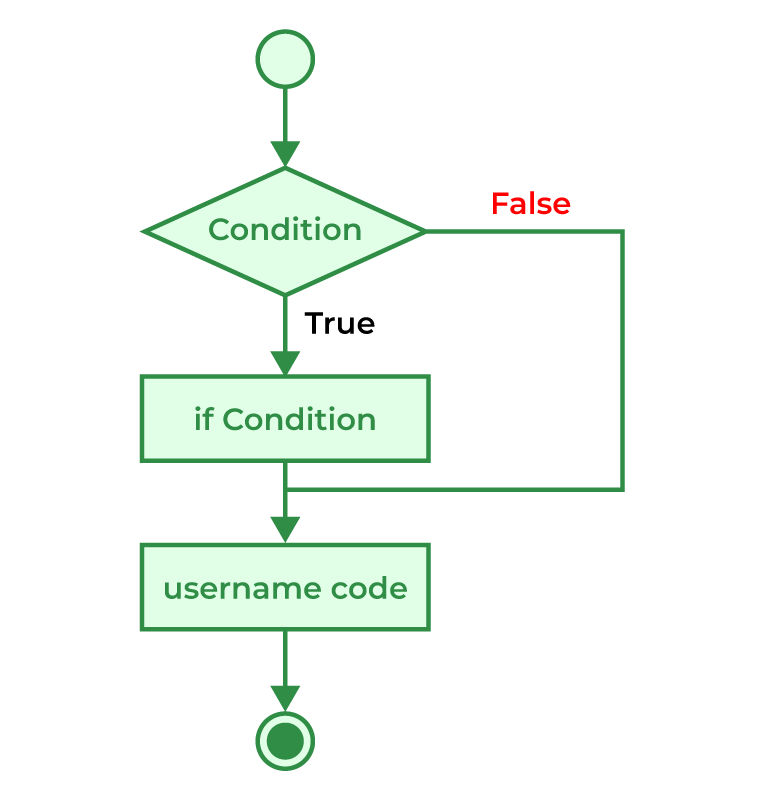
The simple if statement is the most simple decision-making statement. It is used to decide whether a certain statement or block of statements will be executed or not i.e if a certain condition is true then a block of statements is executed otherwise not.
Syntax:
if(condition)
{
   // Inside Statements to execute if
   // condition is true
}
  // Outside statements
If the expression returns true, then the statement-inside will be executed, otherwise statement-inside is skipped and only the statement-outside is executed.
Flowchart :
Example :
// C program to illustrate If statement
#include <stdio.h>
int main()
{
	int i = 10;
	if (i > 15) {
		printf("10 is greater than 15");
	}
	printf("I am Not in if");
}

/*
Output :
I am Not in if
*/
2. if-else statement
The if statement alone tells us that if a condition is true it will execute a block of statements and if the condition is false it won’t. Here we use the else statement with the if statement to execute a block of code when the condition is false.
Syntax :
if (condition)
{
// Executes this block if
// condition is true
}
else
{
// Executes this block if
// condition is false
}
Flowchart of if-else Statement

Example of if-else :
// C program to illustrate If statement
#include <stdio.h>
int main()
{
	int i = 20;
	if (i < 15) {
		printf("i is smaller than 15");
	}
	else {
		printf("i is greater than 15");
	}
	return 0;
}
Output : i is greater than 15
3. Nested if-else statement
A nested if statements mean an if statement inside another if statement.
Syntax :
if( expression )
{
if( expression1 )
{
statement block1;
}
else
{
statement block2;
}
}
else
{
statement block3;
}
if expression is false then statement-block3 will be executed, otherwise the execution continues and enters inside the first if to perform the check for the next if block, where if expression 1 is true the statement-block1 is executed otherwise statement-block2 is executed.
Flowchart of Nested if-else :

Example of Nested if-else :
// C program to illustrate nested-if statement
#include <stdio.h>
int main()
{
	int i = 10;

	if (i == 10) {
		// First if statement
		if (i < 15)
			printf("i is smaller than 15\n");

		// Nested - if statement
		// Will only be executed if statement above
		// is true
		if (i < 12)
			printf("i is smaller than 12 too\n");
		else
			printf("i is greater than 15");
	}

	return 0;
}
Output : i is smaller than 15 i is smaller than 12 too
4. if-else-if Ladder statement
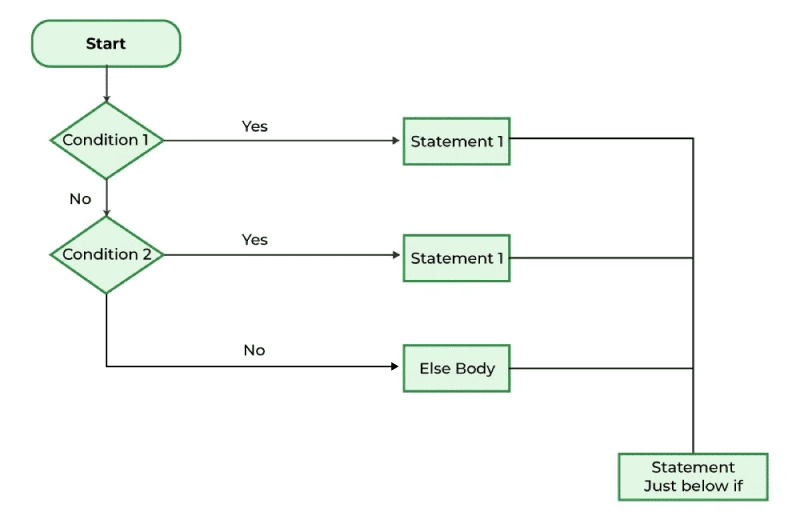
The if-else-if Ladder statements are used when the user has to decide among multiple options. Here, the statements are executed from the top down. As soon as one of the conditions controlling the if is true, the statement associated with that if is executed, and the rest of the C else-if ladder is bypassed. If none of the conditions is true, then the final else statement will be executed. if-else-if ladder is similar to the switch statement.
Syntax:if (condition-1)
statement-1;
else if (condition-2)
statement-2;
else if (condition-3)
statement-3;
...
...
else
statement-n;
Flowchart of if-else-if Ladder :
Example :
// C program to illustrate nested-if statement
#include <stdio.h>

int main()
{
	int i = 20;

	if (i == 10)
		printf("i is 10");
	else if (i == 15)
		printf("i is 15");
	else if (i == 20)
		printf("i is 20");
	else
		printf("i is not present");
}

/*
Output :
i is 20
*/
5. switch Statement in C
When you want to solve multiple option type problems, for example: Menu like program, where one value is associated with each option and you need to choose only one at a time, then, switch statement is used.
The switch statement is an alternative to the if else if ladder that can be used to execute the conditional code based on the value of the variable specified in the switch statement. The switch block consists of cases to be executed based on the value of the switch variable.
Syntax:
switch (expression) {
    case value1:
        statements;
    case value2:
        statements;
    ....
    ....
    ....
    default:
        statements;
}

Flowchart of switch:

Example of switch case :
// C Program to illustrate the use of switch statement
#include <stdio.h>

int main()
{
	// variable to be used in switch statement
	int var = 2;

	// declaring switch cases
	switch (var) {
	case 1:
		printf("Case 1 is executed");
		break;
	case 2:
		printf("Case 2 is executed");
		break;
	default:
		printf("Default Case is executed");
		break;
	}

	return 0;
}

/*
Output :
Case 2 is executed
*/
6. Conditional Operator in C
The ternary operator, also known as the conditional operator in the C language can be used for statements of the form if-then-else.
Syntax :(Expression1)? Expression2 : Expression3;
Here is how it works:
- The question mark
?in the syntax represents the if part. - The first expression (expression 1) returns either true or false, based on which it is decided whether (expression 2) will be executed or (expression 3)
- If (expression 1) returns true then the (expression 2) is executed.
- If (expression 1) returns false then the expression on the right side of
:i.e (expression 3) is executed.
Example of Ternary Operator
#include <stdio.h>
int main() {
   int a = 20, b = 20, result;

   /* Using ternary operator
      - If a == b then store a+b in result
      - otherwise store a-b in result
   */
   result = (a==b)?(a+b):(a-b);

   printf("result = %d",result);
   return 0;
}
Output :result = 40
7. Jump Statements
These statements are used in C for the unconditional flow of control throughout the functions in a program. They support four types of jump statements. These are:
7.1 Break
This loop control statement is used to terminate the loop. As soon as the break statement is encountered from within a loop, the loop iterations stop there, and control returns from the loop immediately to the first statement after the loop.
Syntax : break;
Basically, break statements are used in situations when we want to terminate the loop based on some condition.
Flowchart :

Example :
// C program to illustrate
// to show usage of break
// statement
#include <stdio.h>

void findElement(int arr[], int size, int key)
{
	// loop to traverse array and search for key
	for (int i = 0; i < size; i++) {
		if (arr[i] == key) {
			printf("Element found at position: %d",
				(i + 1));
			break;
		}
	}
}

int main()
{
	int arr[] = { 1, 2, 3, 4, 5, 6 };

	// no of elements
	int n = 6;

	// key to be searched
	int key = 3;

	// Calling function to find the key
	findElement(arr, n, key);

	return 0;
}

/*
Output :

Before if-else block 0
if block 100
After if block 0
*/
7.2 continue
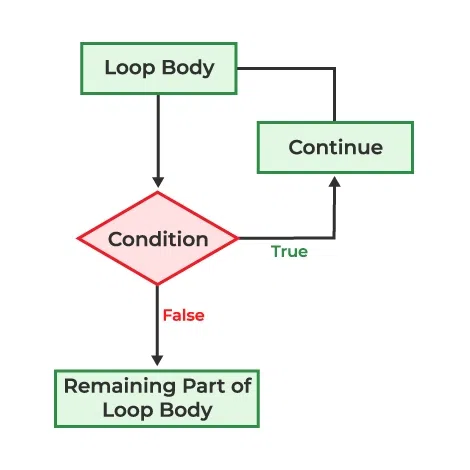
As the name suggests the continue statement forces the loop to continue or execute the next iteration. When the continue statement is executed in the loop, the code inside the loop following the continue statement will be skipped and the next iteration of the loop will begin.
Syntax:continue;
Flowchart of continue:
Example of continue:
// C program to explain the use
// of continue statement
#include <stdio.h>

int main()
{
	// loop from 1 to 10
	for (int i = 1; i <= 10; i++) {

		// If i is equals to 6,
		// continue to next iteration
		// without printing
		if (i == 6)
			continue;

		else
			// otherwise print the value of i
			printf("%d ", i);
	}

	return 0;
}

/*
Output :

1 2 3 4 5 7 8 9 10
*/
7.3 goto statement
The goto statement in C/C++ also referred to as the unconditional jump statement can be used to jump from one point to another within a function.
Syntax:
Syntax1      |   Syntax2
----------------------------
goto label;  |    label:
.            |    .
.            |    .
.            |    .
label:       |    goto label;


In the above syntax, the first line tells the compiler to go to or jump to the statement marked as a label. Here, a label is a user-defined identifier that indicates the target statement. The statement immediately followed after ‘label:’ is the destination statement. The ‘label:’ can also appear before the ‘goto label;’ statement in the above syntax.
Example of goto statement:
// C program to print numbers
// from 1 to 10 using goto
// statement
#include <stdio.h>

// function to print numbers from 1 to 10
void printNumbers()
{
	int n = 1;
label:
	printf("%d ", n);
	n++;
	if (n <= 10)
		goto label;
}

// Driver program to test above function
int main()
{
	printNumbers();
	return 0;
}

/*
Output:
1 2 3 4 5 6 7 8 9 10
*/
7.4 return statement
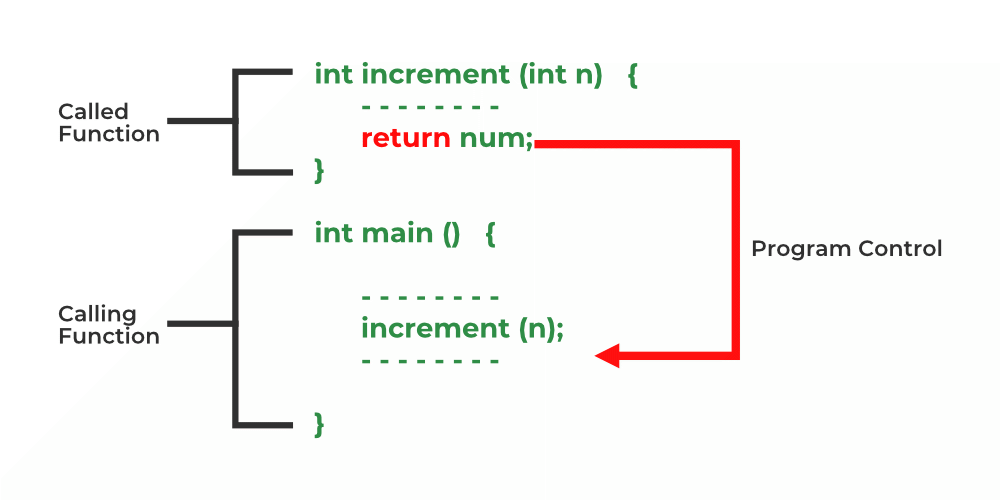
The return statement returns the flow of the execution to the function from where it is called. This statement does not mandatorily need any conditional statements. As soon as the statement is executed, the flow of the program stops immediately and returns the control from where it was called.
Syntax :return [expression];
Flowchart:
Example :
// C code to illustrate return
// statement
#include <stdio.h>

// non-void return type
// function to calculate sum
int SUM(int a, int b)
{
	int s1 = a + b;
	return s1;
}

// returns void
// function to print
void Print(int s2)
{
	printf("The sum is %d", s2);
	return;
}

int main()
{
	int num1 = 10;
	int num2 = 10;
	int sum_of = SUM(num1, num2);
	Print(sum_of);
	return 0;
}

/*
Output:
The sum is 20
*/
Comment on “Day – 2/Part – 3 : Decision Making and Control Statements in C”