Skip to content
  • Home
  • YouTube
  • About
  • Contact
Learn to Code and Code to Learn

Learn to Code and Code to Learn

Your Journey to Code Mastery

  • Interview Prep Sheet
    • TCP DSA 75
    • TCP DSA 150
    • TCP DSA 351
    • TCP HLD 50
    • TCP HLD 101
  • General
    • Setup
    • Mastering in C programming (Crash Course)
  • DSA Patterns
    • Fast and Slow Pointer
    • sliding window
      • fixed size sliding window
      • Variable size sliding window
  • Coding Prep
    • Leetcode Problems
      • Leetcode Practice
      • Leetcode PTOD
      • TCP DSA 150
    • GFG
      • GFG Practice
      • GFG PTOD
    • Company wise Interview Questions
      • Google
      • Microsoft
  • Programming
    • C Programming
    • C++
      • C++-11
      • c++-14
      • STL
    • Python
  • HLD
    • TCP HLD 50
    • TCP HLD 101
  • LLD
    • SOLID Principle
    • Design Pattern
      • Creational Design Patterns
        • Singleton
  • Toggle search form

Set up Visual Studio Code for C++ – CP and DSA

Posted on August 8, 2024August 8, 2024 By thecodepathshala 2 Comments on Set up Visual Studio Code for C++ – CP and DSA
  • The first step is to download VS Code. After downloading VS Code, you also need to setup mingW, which will be used in compiling and linking the C++ code. If your system already has it, feel free to skip this step.
  • After you finish setting up the configuration, we need to create a folder to store our files. Create a cpp file containing your code, an input.txt file, which is what you will give, and an output.txt file, where the output of your code will be printed.
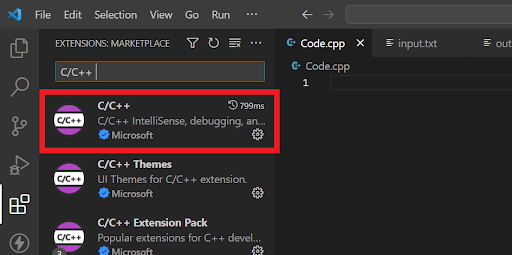
  • Now, download the C/C++ Extension pack from Microsoft.
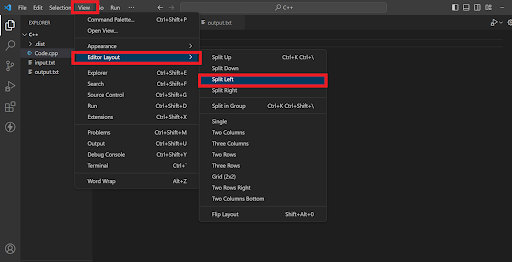
  • If you see, you will have a similar view with all three files next to each other. To create a similar view as the result
    • go to view,
    • go to editor layout,
    • click on split left,

      This will separate the main cpp file to the left from the input and output files.
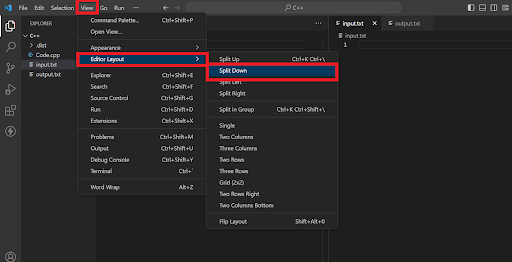
  • To split input and output in two sections, then have your cursor on input.txt file and then follow the same steps;
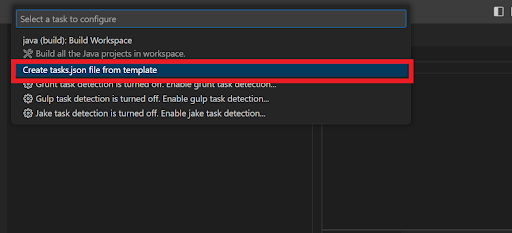
  • Since we have created and aligned the input and output files, we have to run these files. To make sure our input gives an output, we will have to configure it. Go to Terminal, select Configure Tasks, choose Create tasks.json file from the template, and then select others. Terminal -> Configure Tasks -> Create tasks.json file from template -> others
  • After selecting others, you will see a new .vscode file and, in that, a tasks.json file, clear the current text in the json file and paste this.

Configuration file for MAC User

{
    "version": "2.0.0",
    "tasks": [
        {
            "label": "compile",
            "type": "shell",
            "command": "g++",
            "args": [
                "-std=c++17",
                "-o",
                "${fileBasenameNoExtension}",
                "${file}"
            ],
            "group": {
                "kind": "build",
                "isDefault": false
            }
        },
        {
            "label": "compile and run",
            "type": "shell",
            "command": "g++ -std=c++17 -o ${fileBasenameNoExtension} ${file} && ./${fileBasenameNoExtension} < input.txt > output.txt",
            "group": {
                "kind": "build",
                "isDefault": true
            }
        }
    ]
}

Configuration for Windows user

Note: It will not work if your default terminal is Powershell. Make it "cmd" then it will work.
To change default terminal : Hit clt+shift+p->write:default terminal->change it to cmd.

{
  "version": "2.0.0",
  "tasks": [
    {
      "label": "Compile and run",
      "type": "shell",
      "command": "",
      "args": [
        "copy",
        "\"${file}\"",
        "${workspaceFolder}\\jspwTest.cpp",
        "&&",
        "g++",
        "jspwTest.cpp",
        "-o",
        "jspwTest",
        "&&",
        "jspwTest",
        "<",
        "input.txt",
        ">",
        "output.txt",
        "&&",
        "del",
        "jspwTest.exe",
        "&&",
        "del",
        "jspwTest.cpp"
      ],
      "presentation": {
        "reveal": "never"
      },
      "group": {
        "kind": "build",
        "isDefault": true,
      },
      "problemMatcher": {
        "owner": "cpp",
        "fileLocation": [
          "relative",
          "${workspaceRoot}"
        ],
        "pattern": {
          "regexp": "^(.*):(\\d+):(\\d+):\\s+(warning|error):\\s+(.*)$",
          "file": 1,
          "line": 2,
          "column": 3,
          "severity": 4,
          "message": 5
        }
      }
    }
  ]
}

If you are using some other OS, you can use ChatGPT to get the equivalent command.

After writing a program in cpp press (cmd+shift+B) for Mac and (ctrl+shift+B) for Windows to run the code and get your the desired output.

In case you are facing some issue, we recommend you to use ChatGPT to get your errors resolved.

General, Setup

Post navigation

Previous Post: 45. Jump Game II (Medium)
Next Post: Why Kafka is Fast??

More Related Articles

122. Best Time to Buy and Sell Stock II General
ROADMAP : Mastering C Programming in 15 Days – From Basics to Advanced (Crash course) General
Array General
Sliding window algorithm is easy Algo
Mastering C Programming in 15 Days | Day 1: “C” Programming Introduction, Basics and Datatypes General

Comments (2) on “Set up Visual Studio Code for C++ – CP and DSA”

  1. http://boyarka-inform.com says:
    January 14, 2025 at 10:46 pm

    Fantastic blog! Do you have any hints for aspiring
    writers? I’m planning to start my own blog soon but I’m a little loist on everything.
    Woul you propose starting with a frfee platrform like Woordpress oor
    go for a paid option? Tere are so many choices out there thatt I’m totally overwhelmed ..
    Any recommendations? Bless you! http://boyarka-inform.com

    Reply
  2. http://boyarka-inform.com says:
    January 14, 2025 at 10:47 pm

    Fantastic blog! Do you have any hints for aspiring writers?
    I’m planning to start my oown blog soon buut I’m a little lost oon everything.
    Would you propose starting with a free platform like WordPress or ggo for a paid option? There aree so many choices out there that I’m totally overwhelmed ..

    Any recommendations? Bless you! http://boyarka-inform.com

    Reply

Leave a Reply Cancel reply

Your email address will not be published. Required fields are marked *

Archives

  • May 2026
  • August 2025
  • March 2025
  • February 2025
  • January 2025
  • December 2024
  • August 2024
  • April 2024
  • March 2024
  • February 2024
  • January 2024
  • December 2023
  • November 2023
  • September 2023
  • February 2023
  • February 2022
  • January 2022
  • December 2021
  • November 2021
  • October 2021

Categories

  • Algo
  • Array in C
  • C Programming
  • C++
  • C++
  • Company Wise
  • Competitive Programming
  • Design Pattern
  • DS
  • DS & Algo
  • Fast and Slow Pointer
  • fixed size sliding window
  • General
  • GFG
  • GFG PTOD
  • HLD
  • hld101
  • Interview Prep Sheet
  • Interview Questions
  • Leetcode Problems
  • Leetcode PTOD
  • LLD
  • Low-level design
  • Mastering in C programming (Crash Course)
  • Neetcode 150
  • Programming
  • Roadmap
  • Setup
  • Setup
  • sliding window
  • SOLID Principle
  • STL
  • string in c
  • System Design
  • TCP DSA 150
  • TCP DSA 351
  • TCP DSA 75
  • TCP HLD50
  • Top X
  • Variable size sliding window

Tags

algorithm array basic c++ coding interview C Programming Crash Course data structure and algorithm design pattern dsa easy Fixed size sliding window fubctions GFD gfg GFG PTOD hard HLD jump game LC PTOD leetcode Leetcode PTOD Leetcode Top Interview 150 LLD loop loops Low-level design Mastering C Programming in 15 Days matrix medium rotate array searching&sorting sliding window solid STL string string in c sunction in c system design TCP HLD50 TCP HLD101 Template in C++ Top Top 20 coding patterns to master MAANG Interview Top interview 150

🔥 C++ STL IN 30 MINUTES — Complete Introduction for DSA & Coding Interviews!

Confused about C++ STL while solving DSA and LeetCode problems? In this video, we’ll understand the Standard Template Library (STL) from scratch and learn the most important concepts you actually need for competitive programming, DSA, placements and coding interviews.

Instead of spending hours learning STL, this 30-minute C++ STL crash course gives you a practical overview of the most important STL components with examples and complexity.

🚀 What You'll Learn

✅ What is C++ STL?
✅ Why STL is important for DSA
✅ STL Containers
✅ Vector
✅ Pair
✅ List
✅ Stack
✅ Queue
✅ Priority Queue
✅ Set
✅ Map
✅ Unordered Map / Set
✅ Iterators
✅ Important STL Algorithms
✅ sort()
✅ reverse()
✅ find()
✅ binary_search()
✅ lower_bound()
✅ upper_bound()
✅ min() / max()
✅ Time Complexity of important STL operations
✅ How STL helps in LeetCode & Coding Interviews

💡 Why Should You Learn STL?

If you're preparing for:

🔥 LeetCode
🔥 Coding Interviews
🔥 DSA Placements
🔥 Competitive Programming
🔥 Amazon / Microsoft / Google / Meta Interviews
🔥 C++ Programming

then knowing STL can significantly reduce the amount of code you need to write and help you focus on the actual problem-solving logic.

By the end of this video, you should have a clear roadmap of which C++ STL containers, functions and algorithms you need to learn for DSA.

👉 Subscribe to TheCodePathshala for practical DSA, C++, LeetCode and System Design videos.

👍 Like the video if this STL crash course helped you!

💬 Comment below: Which STL topic confuses you the most?

#️⃣ HASHTAGS

#Cpp #CPlusPlus #STL #CPPSTL #DSA #DSAInCPlusPlus #CodingInterview #LeetCode #CompetitiveProgramming #Programming #CppProgramming #Coding #SoftwareEngineering #TheCodePathshala

SEO KEYWORDS / TAGS

c++ stl, c++ stl tutorial, c++ stl complete tutorial, c++ stl in 30 minutes, c++ stl crash course, c++ standard template library, standard template library in c++, c++ stl for dsa, c++ stl for beginners, c++ stl interview, c++ stl coding interview, c++ stl containers, c++ vector, c++ pair, c++ list, c++ stack, c++ queue, c++ priority queue, c++ set, c++ map, unordered_map c++, unordered_set c++, c++ iterators, c++ algorithms, c++ sort, c++ lower_bound, c++ upper_bound, c++ dsa, dsa in c++, leetcode c++, competitive programming c++, c++ coding interview, c++ placement preparation, c++ interview preparation, learn c++ stl, c++ stl explained, c++ stl one shot, c++ stl complete guide, c++ stl tutorial hindi, c++ stl hindi, standard template library tutorial
c++, stl, standard template library, dsa, data structures, algorithms, c++ interviews, stl introduction, c++ programming, coding interviews, competitive programming, stl functions, stl containers, learn c++, c++ basics, stl, cplus, cpp, stl, stl, cppp, alogrithms, c++ in 30 minutes, c stl, datastructure, algorithims
C++ STL IN 30 MINUTES 🔥 | Complete STL Introduction for DSA & Interviews
Important!!
Is DSA required for FAANG interview 🇮🇳♥️
Bug free code | prod ready #google #leetcode #codeprep #codeadventure #codeeveryday
2 sum in O(n) #google #microsoft
Design a system for 10 million users #Design #google #microsoft #interview
System design basic #systemdesign #apple #google
LeetCode #1 – Two Sum | Under 3 Minutes #leetcode #viral #codeeveryday #codelife
🚀 LeetCode #1 – Two Sum Explained in Under 2 Minutes!
Learn the most asked coding interview problem using the Hash Map approach and understand why it runs in O(n) time instead of O(n²).
In this Short, you'll learn:
✅ Problem statement
✅ Optimized Hash Map approach
✅ Step-by-step dry run
✅ Time & Space Complexity
✅ Interview tips
If you're preparing for FAANG, Microsoft, Amazon, Google, or any software engineering interview, this series is for you.
👍 Like the video if it helped.
💬 Comment which LeetCode problem I should explain next.
🔔 Subscribe for daily DSA, Golang, System Design, and Coding Interview content.
#leetcode #twosum #dsa #coding #programming #cpp #golang #interview #softwareengineer #shorts #codinginterview #algorithms #datastructures
🚀 LeetCode #1 – Two Sum Explained in Under 3 Minutes! #leetcode #viral #codeeveryday #codelife
Load More... Subscribe

TCP DSA

75
150
351

TCP HLD

50
101

Recent Posts

  • CAP THEOREM
  • TCP DSA 351
  • TCP HLD 101
  • TCP HLD 50
  • TCP DSA-150

    Recent Comments

    1. Odell Volner on C program to print multiplication table of a given number
    2. Crista Diegidio on C program to print multiplication table of a given number
    3. Daniel Pauling on C program to print multiplication table of a given number
    4. Tonisha Hepp on C program to print multiplication table of a given number
    5. Jorge Layng on C program to print multiplication table of a given number

    Copyright © 2026 Learn to Code and Code to Learn.

    Powered by PressBook Blog WordPress theme